Find the brick. Free the flow.
Answer Monday’s hot list by lunch, with dates you can defend.
Finite-capacity planning for make-to-order job shops. Unbrick sits on top of your ERP, plans your shop forward with the hours your people actually work, and turns a customer’s priority list into an approved answer, with the evidence behind every date. It never writes back to your ERP.
- PO-4471MA-5023 × 4Oct 22Ships Oct 21
- PO-4472MA-5031 × 30Oct 27Blocked · quality hold
- PO-4480ma 5026 × 3Oct 23Read as MA-5026 · Oct 23
- PO-4475MK-1084 × 61Oct 29Ships Oct 29
- PO-4478MA-5013 × 100Nov 6Partial · 45 now
- PO-4481MA-5031 × TBDOct 24Can’t confirm · ask qty
…and 20 more lines

- Reads your ERP’s nightly reports
- Never writes back
- Nothing reaches into your network
- No third-party AI sees your data
- Hosted, or on your own server
| PO | Part | Qty | Need by |
|---|---|---|---|
| PO-4471 | MA-5023 | 4 | Oct 22 |
| PO-4472 | MA-5031 | 30 | Oct 27 |
| PO-4475 | MK-1084 | 61 | Oct 29 |
| PO-4478 | MA-5013 | 100 | Nov 6 |
| PO-4480 | ma 5026 | 3 | Oct 23 |
| PO-4481 | MA-5031 | TBD | Oct 24 |
…and 20 more lines
The hot list arrives. Now what?
A day of spreadsheets and phone calls
Your planner rebuilds the answer by hand, line by line, every week.
No line is clearly safe to promise
The answer can’t say what each date depends on: a component, a hold, a lot nobody released.
Someone else slips, and nobody sees it
Pulling one list in pushes other customers’ orders late, and that shows up weeks later.
A question worth asking: how long did your team take to answer the last list, and how sure were you of the answer?
Not another grid of numbers
Press play and watch your shop: the last eight weeks from your labor records, then the plan carrying every lot forward. Put a change beside it and play both. Click any dot for the lot behind it.

Plant map
Flat or 3D, laid over your own floor plan. Load against capacity, day by day.
Order journey
Every lot behind a late order, and the one that sets its date, in plain words.
Plan engines
Open-source solvers propose; the whole plan is rerun and scored; a planner decides.
Due dates are not finish dates
Many ERP schedules run backward from the due date with unlimited capacity. In a week the shop is loaded past what it can do, those dates stop being a forecast.
Backward, unlimited capacity
How a typical ERP places the work
Week 1 holds twice the hours the shop has. Every date on it still reads as on time.
Forward, finite capacity
How Unbrick plans it, from today
Work is loaded up to the hours your people actually show. What doesn’t fit moves out, and you see which orders turn late.
From hot list to an approved answer
One guided flow, four steps, every decision recorded with a name and a time.
Every row the customer sent is kept
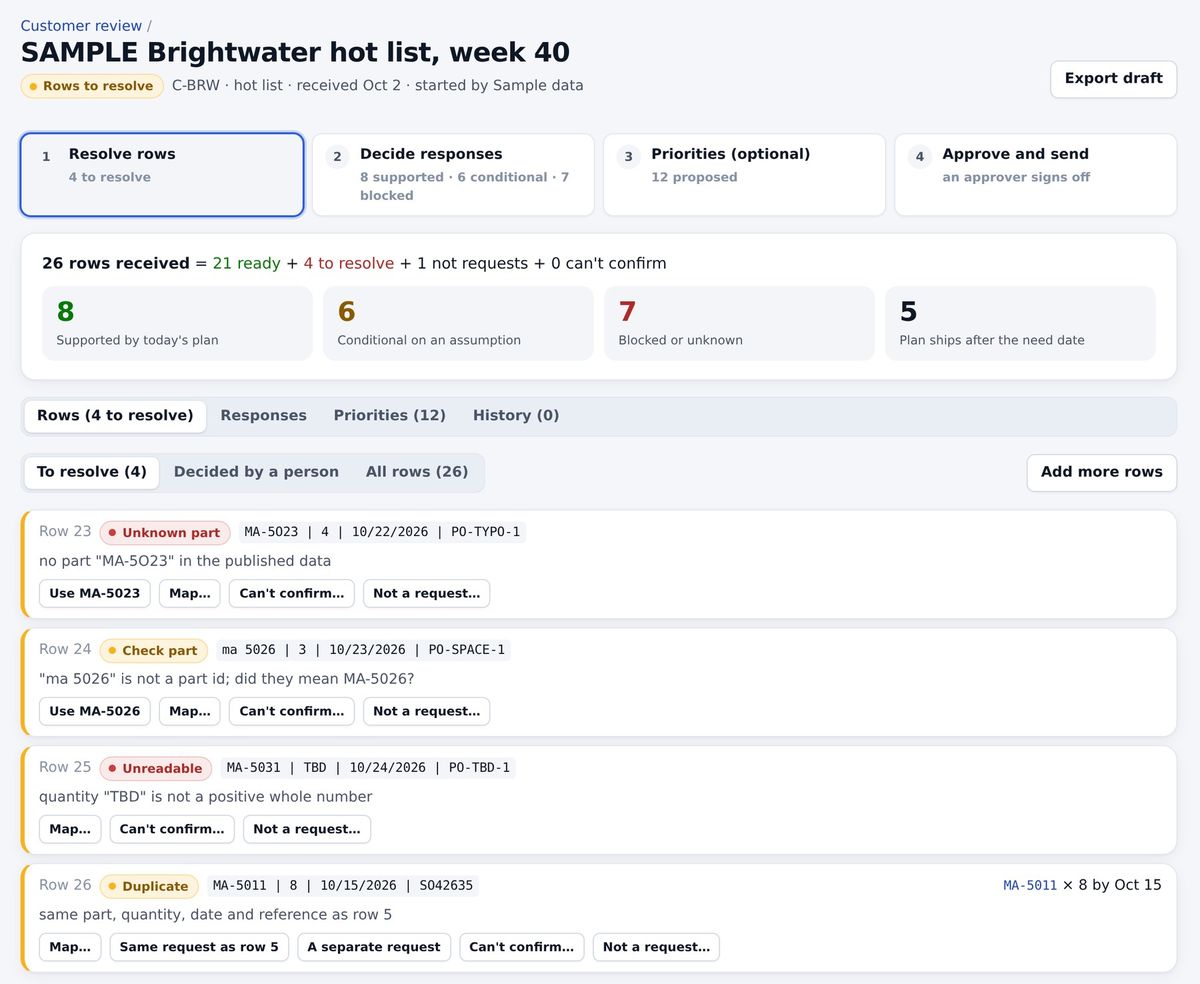
Each line is matched to a part, or set aside with a reason the customer will read. A part written with a space, a letter O for a zero, a quantity of “TBD”, a duplicate line: each is caught and decided by a person. Nothing dropped, nothing guessed.
Each answer shows what it rests on
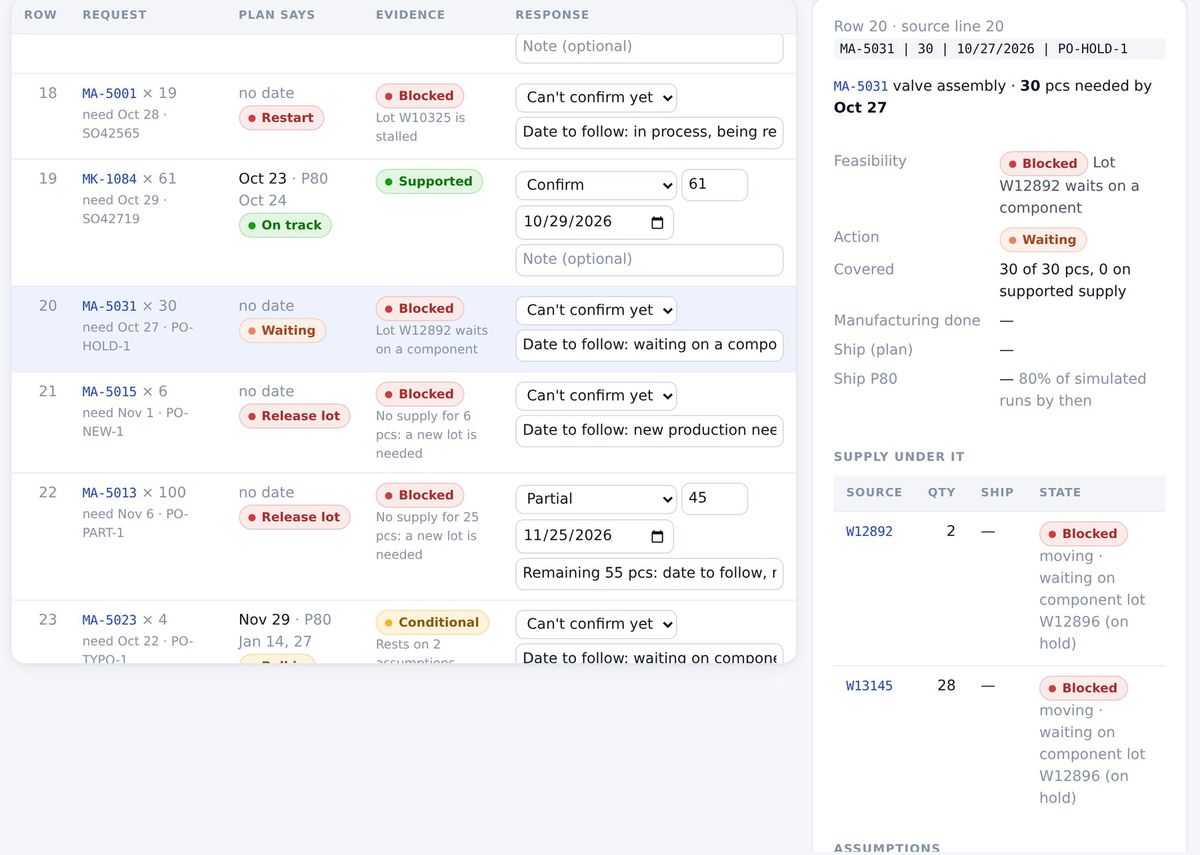
For every request: the date the plan supports, the date 80% of simulated runs finish by, and the lots, holds and assumptions behind it.
The plan backs this date from today’s data.
Rests on an assumption nobody has accepted yet. Not offered as a commitment.
A hold, a stalled lot or missing supply, and what would unblock it.
See who slips before you commit
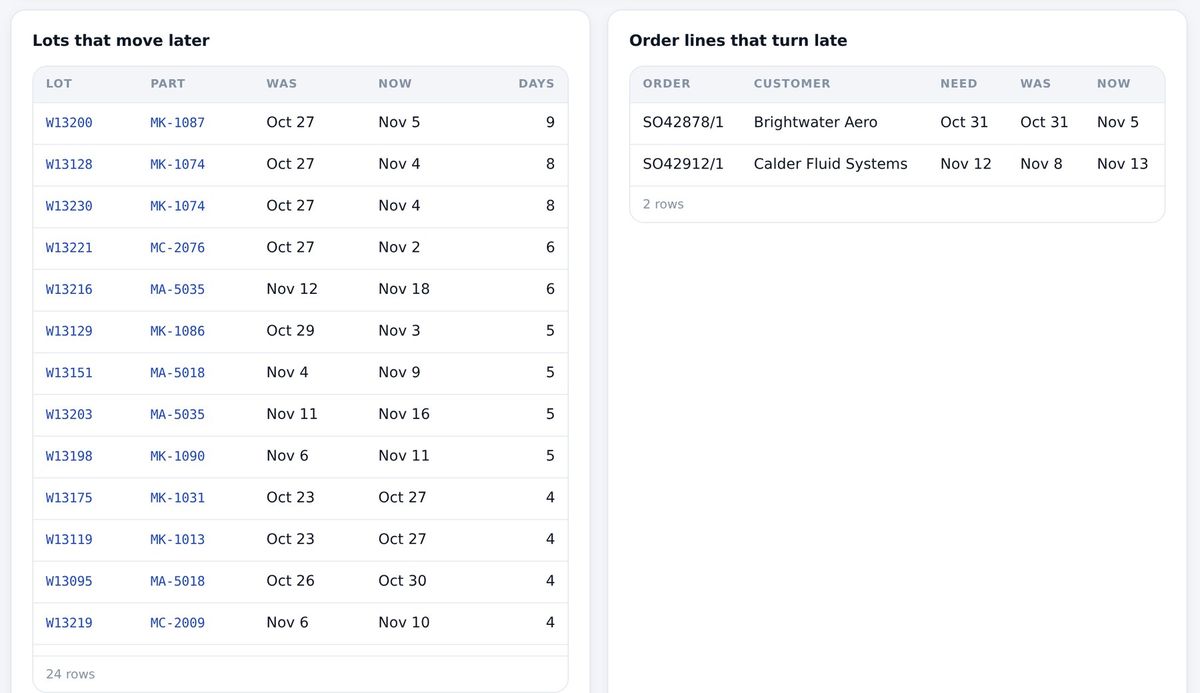
Preview what pulling the list in gains, which lots finish later, and whose orders turn late, including other customers’. Nothing is saved until you decide, and urgency never overrides a quality hold.
Approved by a person, reproducible later
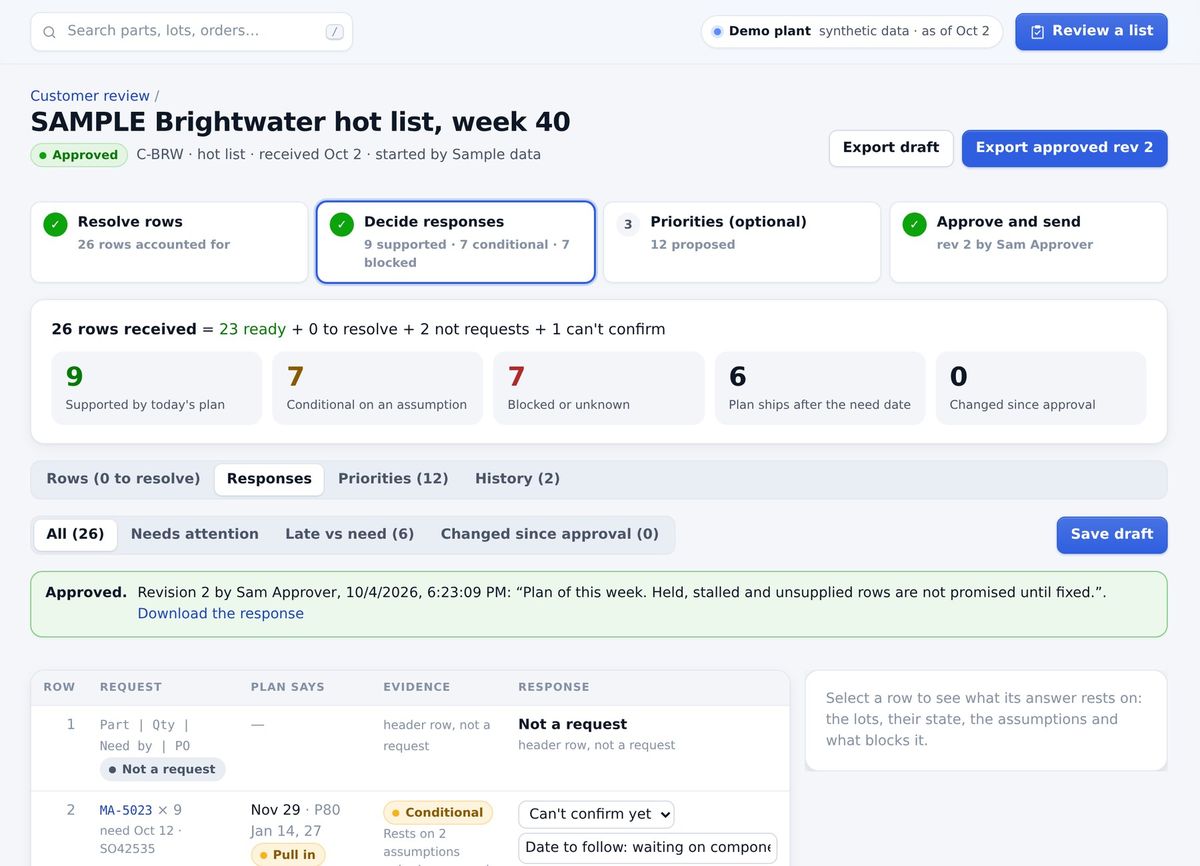
- Planners prepare; they can’t approve their own answer.
- An approver signs off, with a one-line rationale.
- The customer gets an Excel answer: their rows as received, your response, the plan behind it.
- Download it again next month: the same file, byte for byte.
Every screen answers one of four questions
What will we finish, and when?
A date from today’s capacity, and the date 80% of simulated runs finish by. Watch it play out on the plant map.
What will we deliver, and when?
Shipping is its own event, not the last operation. Each order’s journey shows what its date waits on.
Where are we constrained?
The departments that set the pace, in the hours your people actually show, week by week.
What should we do next?
One list each morning: ship, restart, release, move an ERP date, with the frozen window marked.
Try a change before the floor feels it
Staffing scenarios
Add or move people, add a shift, and see when past due recovers and which orders ship sooner.
Plan engines
A slack rule, a bottleneck sequencer (OR-Tools CP-SAT) and crew allocation (HiGHS), each scored on the whole plan.
Sequence board
Rearrange the work at your bottleneck by hand and see whose orders gain and whose slip.
The engines compute. The AI explains. People decide.
Answers cite their sources
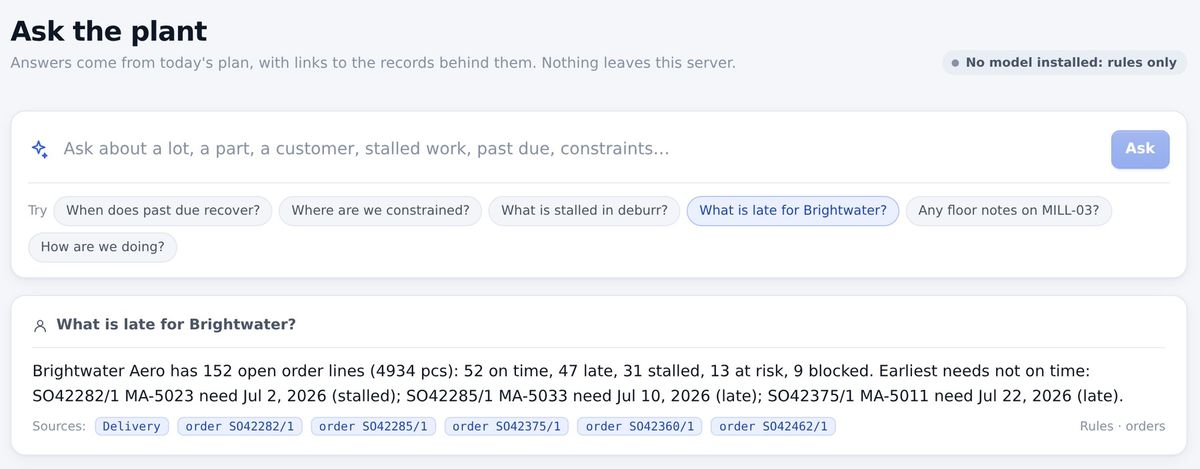
Ask about a lot, a customer or a constraint. Every number links to the record behind it, or the answer says it doesn’t know.
Runs inside your deployment
Models run with your data, on ordinary CPUs. No third-party AI, speech or analytics service ever sees it.
A person confirms every commitment
No model or solver output sets a date, a quantity or a priority on its own. Planners adopt a proposal, with a reason, or don’t.
Bad data is refused
Every nightly load is checked. Stale, partial or re-exported data is refused; yesterday’s plan stays and every screen says so.
Assumptions are named
Where the ERP is silent, the plan says what it assumed, and a date resting on one stays conditional until a person accepts it.
Know-how kept at the machine
Optional station tablets: notes from the last person on a part, “I’m stuck” calls for help, reviewed by supervisors.
Run one real hot list in Unbrick
Your planner, your data, your customer’s list. We measure it together from your own records, and you decide at day 30.
- A sample ERP exportAny CSV reports your ERP already produces.
- Your planner, for an hourTo map the export and walk the first list.
- Last month’s hot listSo we can compare our answer with what happened.